Searching and filtering the Events tab of the Diagnostic Tools window
Nov 12, 2015Angelos Petropoulos
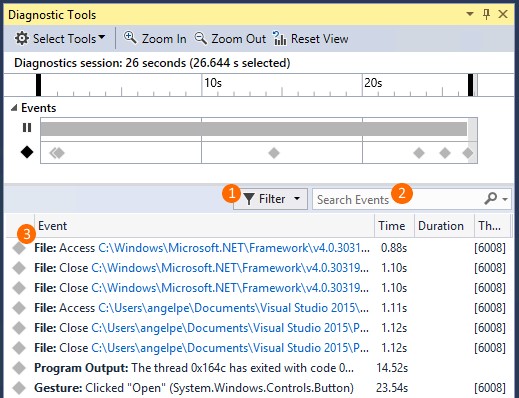
Summary
This post details three key improvements to the Events tab of the Visual Studio 2015 Diagnostic Tools window: category prefixes for improved readability, a new search box identical to the Error List window's functionality, and an enhanced filtering menu allowing customization by category, thread, and 'Just My Code' status. The filtering menu also displays the total event count per category and allows access to more categories via a sub-menu.
More from the IntelliTrace Stand-Alone Collector Configuration trail
- IntelliTrace, method call information, and Edit and Continue
- Finding swallowed and async exceptions using IntelliTrace in VS2015
- Collect data from a windows service using the IntelliTrace Standalone Collector
- IntelliTrace in Visual Studio Enterprise 2015 now supports attach!
- Known Issue for Diagnostics Tool window in Visual Studio 2015 RC: “The diagnostic tools failed unexpectedly”