Adding Application Insights to a Windows 8.1 Universal App
Feb 25, 2015Joshua Weber-MSFT
Summary
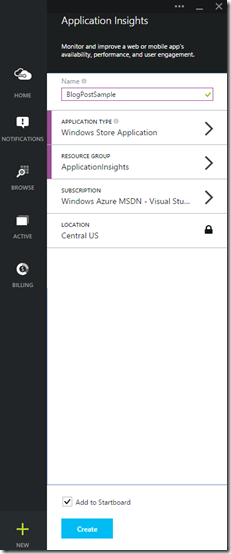
This post details the integration of the Application Insights SDK into Windows 8.1 Universal Apps. It outlines the steps for creating an Application Insights resource in the Azure portal, obtaining the Instrumentation Key, and adding the SDK NuGet packages to both the Store and Phone projects. The post also explains how to configure the `ApplicationInsights.config` file with the Instrumentation Key and discusses the benefits of using a single key for both app types for unified telemetry analysis, while also supporting separate keys for isolated data collection. It highlights that the SDK automatically collects basic telemetry such as user and session tracking, page views, and contextual metadata.
More from the Application Insights Deployment Markers trail
- Issue with using Application Insights with load tests
- Monitor Team Services web extensions with Visual Studio Application Insights
- Getting Application Insights counters with Cloud-based Load Testing
- Application Insights: Choose your own Performance Counters
- Introducing the Application Insights SDK for Java