Enhance your Application Availability Monitoring with VS 2013 Web Test Plugins
Sep 11, 2014Gustavo R Lima
Summary
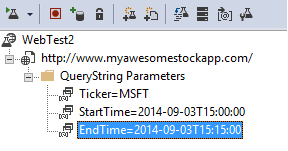
This post introduces the use of Web Test Plugins, specifically the Date Time Plugin, within Application Insights web tests. It demonstrates how to add these plugins to dynamically generate timestamps for request parameters like 'StartTime' and 'EndTime', enabling more realistic availability monitoring for applications requiring current or relative time data. The post provides step-by-step instructions and visual examples of configuring the plugin to use current time and subtract minutes, and how to reference these dynamic values in the web test request using {{ }} notation.
More from the Application Insights Deployment Markers trail
- Issue with using Application Insights with load tests
- Monitor Team Services web extensions with Visual Studio Application Insights
- Getting Application Insights counters with Cloud-based Load Testing
- Application Insights: Choose your own Performance Counters
- Introducing the Application Insights SDK for Java