This thread tracks the evolution of repository migration capabilities. Initially focusing on migrating from Visual Studio and Team Foundation Service to Git, it has expanded to include tools and processes for migrating from Visual SourceSafe to Team Foundation Server and Team Foundation Service. The goal is to provide seamless version control system transitions for developers and teams. This post announces the general availability of importing repositories from TFVC to Git, allowing migration of
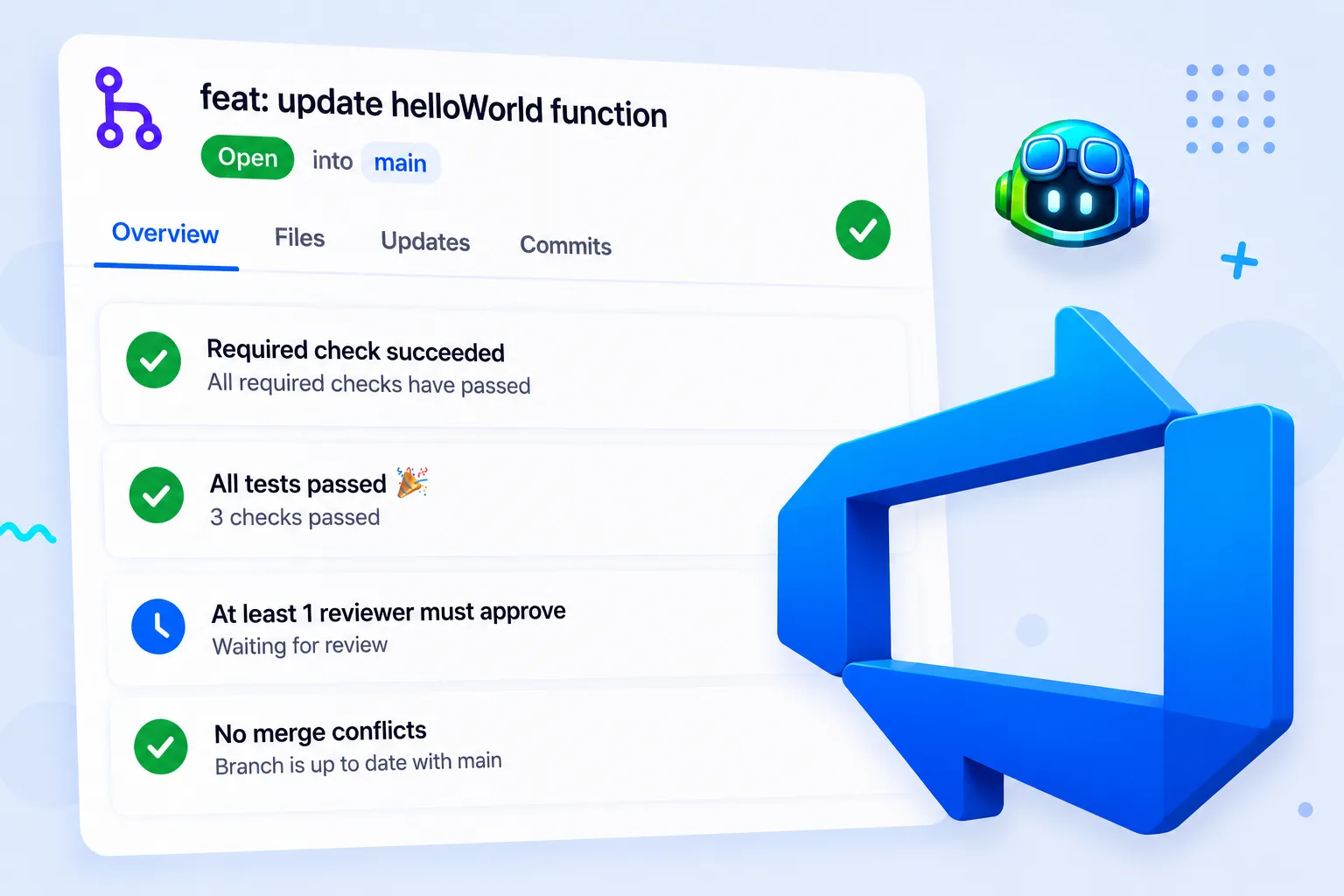
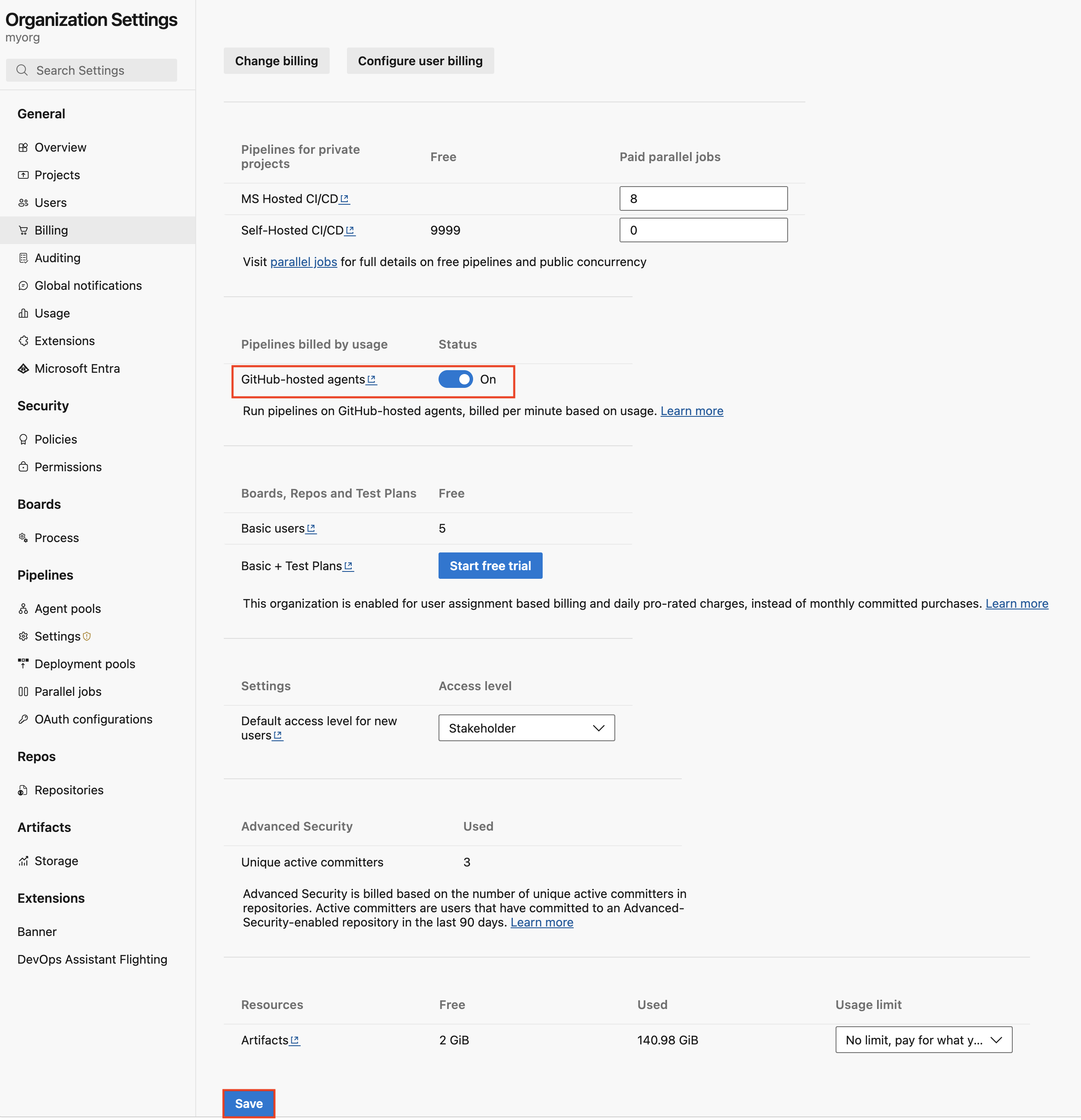
Azure Pipelines supports automated code linting through MegaLinter integration, enabling code consistency checks for various file types (PowerShell, ARM, Bicep, JSON, YAML, Terraform, Markdown) via Pull Request analysis. This allows for parallel linting, parallel linter execution, and direct feedback within PRs, aiming to enforce coding standards and improve code quality. This post adds integration for Lighthouse API for performance monitoring and Axe-Core for accessibility monitoring within CI/CD pipelines. Copilot Code Review for Azure Repos is now in public preview, offering automated code reviews with customizable instructions, support for managed DevOps pools, and improved billing visibility.
This thread tracks the evolution of Azure DevOps Advanced Security capabilities, focusing on vulnerability detection and remediation. Initially, it covered enabling Privileged Identity Management (PIM) for Project Collection Administrator roles and automated code linting. This post introduces work item linking, allowing users to link work items in Boards directly to security alerts, improving context and visibility for vulnerability tracking and remediation.
Azure Pipelines continues to evolve its hosted agent capabilities, providing updated macOS images for building and distributing applications. This includes support for various macOS versions and ensuring compatibility with the latest development tools and frameworks. The deprecation of older macOS images prompts users to migrate to newer, supported versions to maintain pipeline functionality and access the latest features and security updates.
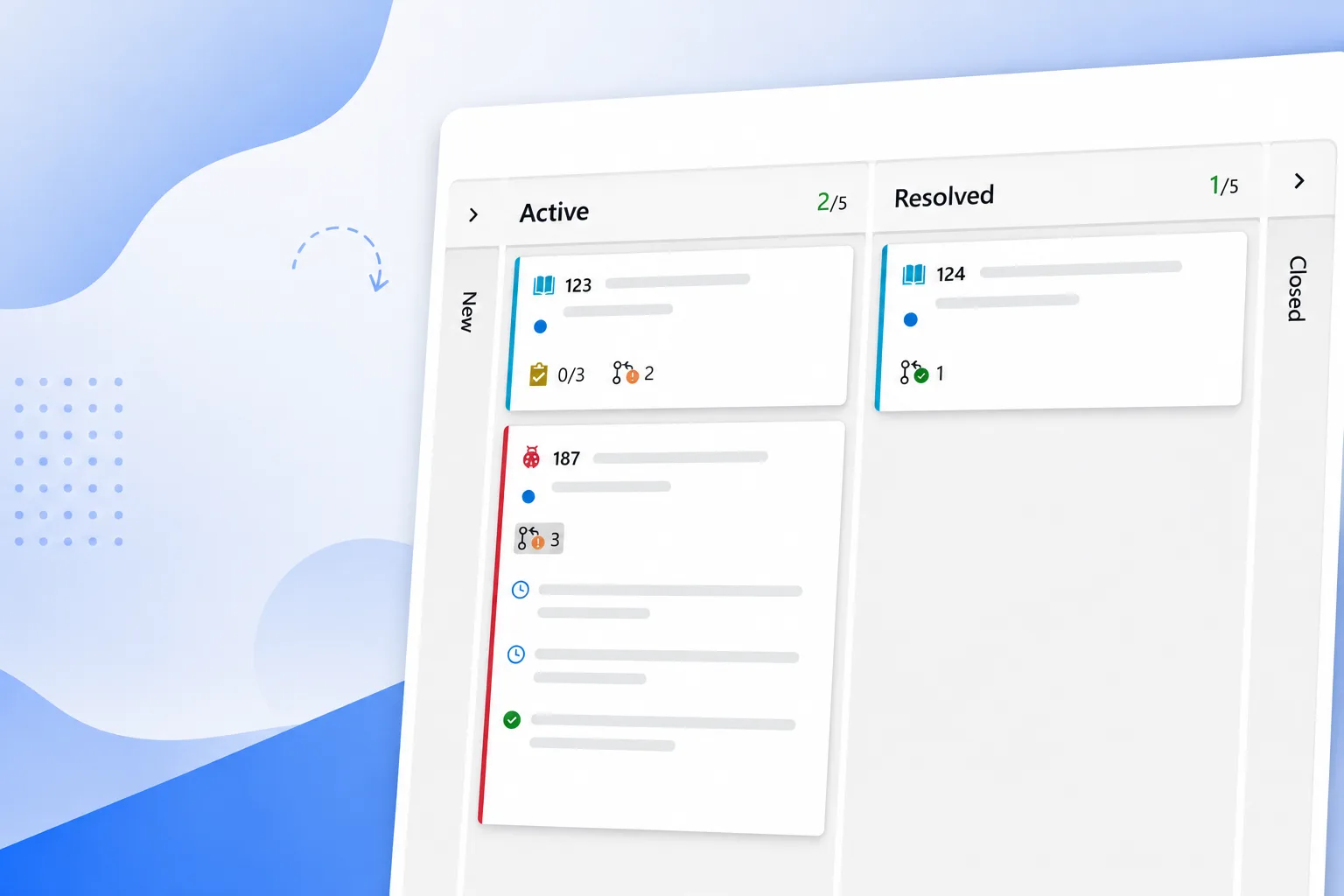
Azure Boards continues to evolve with enhanced reporting and visualization capabilities for Kanban and Sprint workflows. This includes interactive Sprint Burndown, Cumulative Flow Diagram (CFD), and Velocity reports, offering deeper insights into team progress, bottlenecks, and planning. Recent updates focus on improving user experience by introducing new system fields (Board Column, Board Column Done, Board Lane) that capture valuable data from the Kanban board. These fields are now integrated. This post adds pull request annotations directly on work item cards, allowing teams to quickly understand the state of development without opening a work item or switching to Azure Repos. Users can also turn off these annotations in board settings.
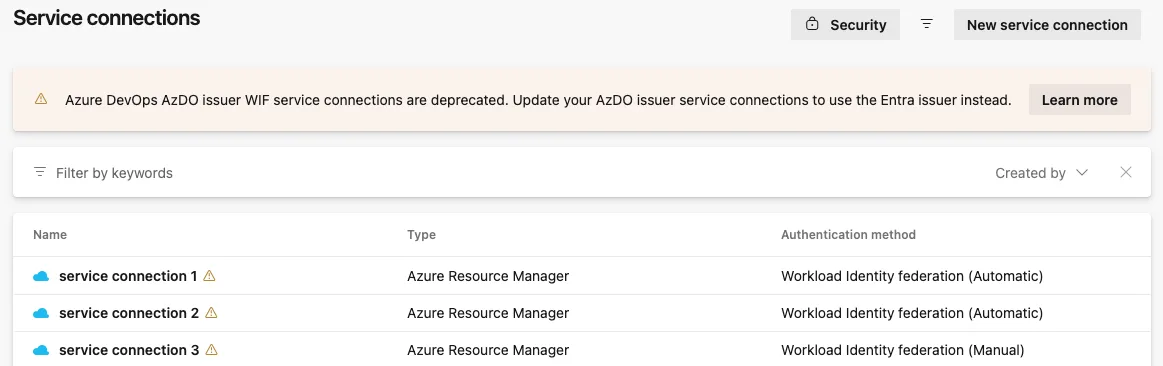
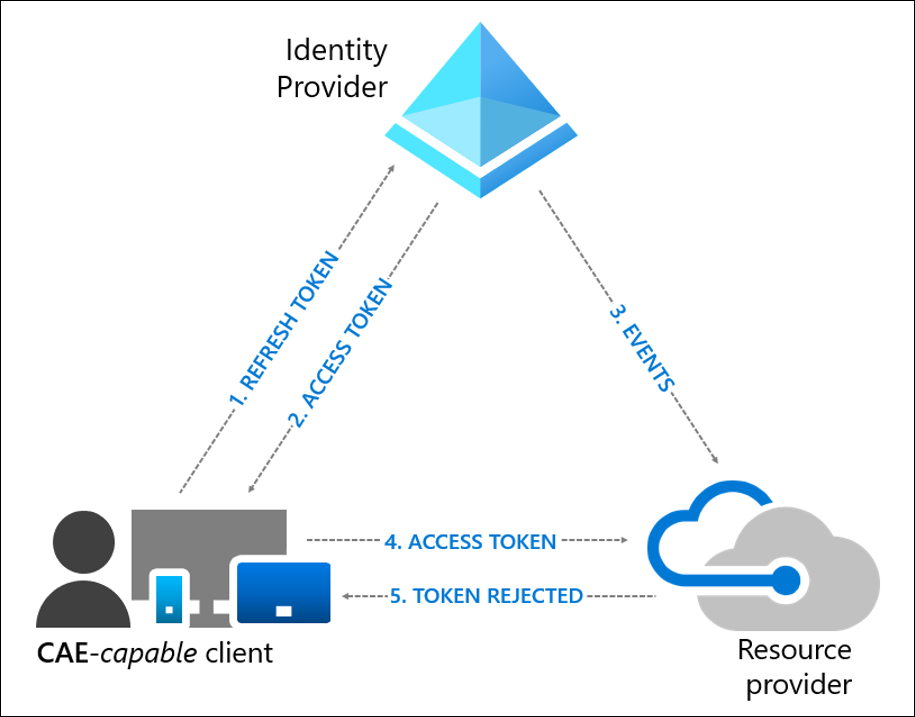
Azure DevOps continues to enhance its authentication and authorization capabilities by introducing the Azure DevOps service connection. This new method allows pipelines to access Azure DevOps resources using Microsoft Entra workload identities (service principals or managed identities) instead of Personal Access Tokens (PATs) or session tokens. This improves security by eliminating the need for persistent secrets, enabling least privilege access, and providing a clear audit trail. This post announces the full web support for conditional access policies across Azure DevOps and partner web properties, utilizing Microsoft Entra tokens for web sessions. This allows for hourly evaluation of identity compliance with Entra policies, supporting a wider range of conditional access policies like device compliance, which was previously limited to less frequent IP-fencing evaluations. Non-interactive flows will continue to support IP-fencing.
This thread tracks the evolution of the Azure DevOps MCP Server, which provides AI assistants with secure, contextual access to Azure DevOps projects for planning, building, and shipping software. The server runs locally, accessing private data without it leaving the system, and supports work items, wiki, repos, and search. This update announces the general availability of the local MCP Server, signifying increased stability and a more deliberate update cadence for the open-source project. Previous updates focused on enabling AI assistants to interact with Azure DevOps projects for tasks like code generation, commit message creation, and pull request summarization. This post extends the capability by highlighting how GitHub Copilot, an AI assistant, can be leveraged by Azure DevOps users, integrating with tools like Visual Studio and VS Code, and providing AI-driven coding assistance and automation within Azure Repos, including commit messages, pull request descriptions, and Azure DevOps Wiki content generation.
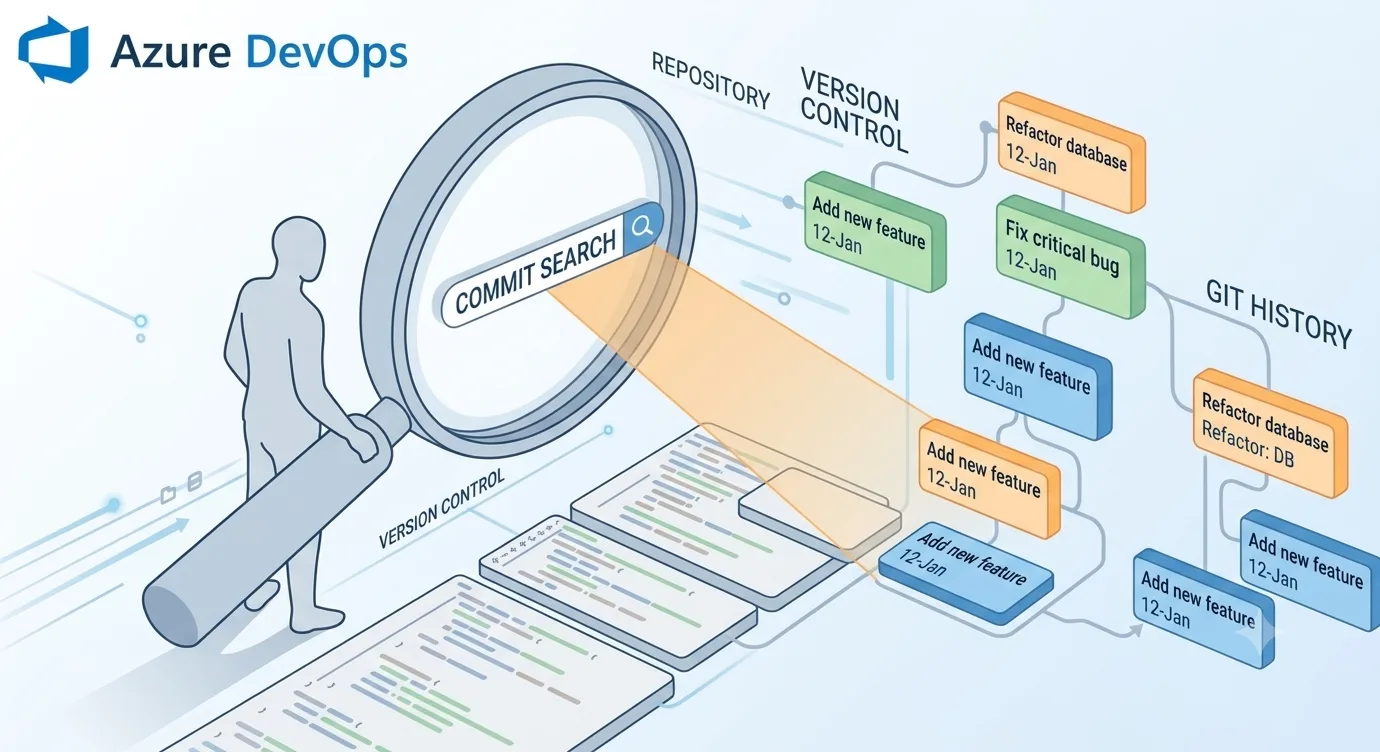
Commit Search is now generally available in Azure DevOps, allowing users to search for commits by text in their title and description across their entire organization. It offers filtering by Project, Repository, Author, and Branch, and sorting by Commit time or Relevance. The feature is rolling out in stages and indexes commit data ahead of time.
Azure Pipelines task extensions are being optimized for size and download/extraction times. This involves bundling Node.js-based tasks using tools like esbuild to reduce the number of files and overall package size. The goal is to improve agent initialization times, reduce build infrastructure costs, and enhance the efficiency of CI/CD pipelines. This optimization applies to any distributable artifact that repeatedly loads a large node_modules tree. This post details the integration of a new build system for TFS/VSTS that simplifies the process of building ASP.NET web applications, generating web deploy packages, and deploying them to Azure Web Sites. It covers registering Azure subscriptions, creating build definitions using the Azure Website template, and configuring build steps for both single and multiple web site deployments.
This thread tracks the evolution of Git authentication methods for Azure DevOps Server, focusing on the deprecation of NTLM and the transition to more secure alternatives like Kerberos and SSH. It addresses the impact of libcurl removing NTLM support and provides guidance for customers to validate their current authentication mechanisms and plan for the transition to avoid service disruption.
Azure DevOps continues to enhance its Kubernetes deployment capabilities by improving service connection management. This evolution addresses limitations with traditional Kubernetes Service Connections, especially for private AKS clusters or those with local accounts disabled. The introduction and expanded support for Azure Resource Manager (ARM) Service Connections in Kubernetes tasks (AzureFunctionOnKubernetes, KubernetesManifest, HelmDeploy, Kubernetes) provide a more robust and secure method. This thread now tracks the evolution of Workload identity federation (OpenID Connect) with Azure DevOps and Terraform, introducing ID Token Refresh capability by default in the Microsoft DevLabs Terraform Task version 5. This capability allows running tasks to request a new ID Token and exchange it for an access token when the previous token has expired, addressing issues like `AADSTS700024: Client assertion is not within its valid time range` during long-running jobs or breaks. This required updates to the azurerm, azapi, and azuread providers, as well as the azurerm backend for Terraform CLI.
Azure Pipelines enhances supply chain security by introducing artifact policies that are enforced before deploying to critical environments. These policies, configured as Checks on Environments, leverage Open Policy Agent to evaluate custom rules against deployable artifacts, including container images and Kubernetes resources. Metadata is automatically attributed to artifacts, and deployments are blocked if policies are not met, ensuring that only compliant artifacts are promoted to production. This thread tracks the evolution of Azure DevOps' security capabilities, specifically focusing on integrating GitHub Advanced Security features like CodeQL and Dependency Scanning into the Azure Pipelines CI/CD workflow. The introduction of Pull Request (PR) Annotation allows security insights to be directly presented as annotations within the PR interface, enabling developers to see and fix potential security issues and vulnerabilities in code and dependencies early in the development cycle. This streamlines secure development practices and integrates security seamlessly into the CI/CD pipeline.
Azure Pipelines supports checking out multiple repositories, enabling users to fetch and check out additional repositories beyond the one storing the YAML pipeline. This simplifies scenarios where pipelines depend on multiple source, tool, or script repositories, eliminating the need for submodules or manual git checkout scripts. Additionally, GitHub Actions can now trigger Azure Pipelines runs using the Azure/pipelines action, allowing for integration of Azure Pipelines into GitHub Actions. This post fixes a null reference exception in the multi-repo trigger functionality when there are no resource repositories defined in the YAML pipeline.
Azure DevOps continues to enhance its security posture by deprecating global Personal Access Tokens (PATs). This evolution moves away from broad-scoped credentials towards organizational-level policies and short-lived, Microsoft Entra–backed authentication. The goal is to reduce the concentrated security risk associated with global PATs, offering improved token governance, stronger identity controls, and a reduced risk of credential exposure. The deprecation includes blocking the creation and re-issuance of global PATs, with a preview of a new policy to restrict PAT creation at the organization level, allowing administrators to control who can create or regenerate PATs. Exceptions can be managed via an allowlist for specific Microsoft Entra users or groups, and a sub-policy supports limiting token creation to packaging scopes only.
Azure Test Plans provides a web-based interface for test management and execution, allowing users to view, edit, and create test cases without requiring client installations. It supports plan-level filtering, pausing and resuming test execution, adding attachments to test outcomes, and testing Windows 8 Store applications. The feature is available for both Team Foundation Service and on-premises Team Foundation Server installations. This post introduces the general availability of the New Test R
This thread tracks patching and maintenance for Team Foundation Server (TFS) and Azure DevOps Server. It includes releases of security patches, cumulative updates, and detailed installation instructions for various scenarios like load-balanced application tiers and SQL mirroring/AlwaysOn configurations. The focus is on ensuring system stability and security through timely updates and adherence to proper installation procedures. This post details the February 2025 patches for Azure DevOps Server 2022.2, including a re-release of Patch 3 to address an issue causing YAML pipelines to fail.
Azure Boards continues to evolve with a focus on improving user experience and productivity. Recent updates include ordering states by process, automatically tagging commenters, enabling live updates for all new boards by default, and introducing Markdown support in large text fields. This post introduces a clearer distinction between preview and edit modes for large text fields, with fields defaulting to preview mode and an explicit edit icon to switch to editing. This change reflects how most users interact with Markdown editors, reducing accidental edits and making interactions more intentional.
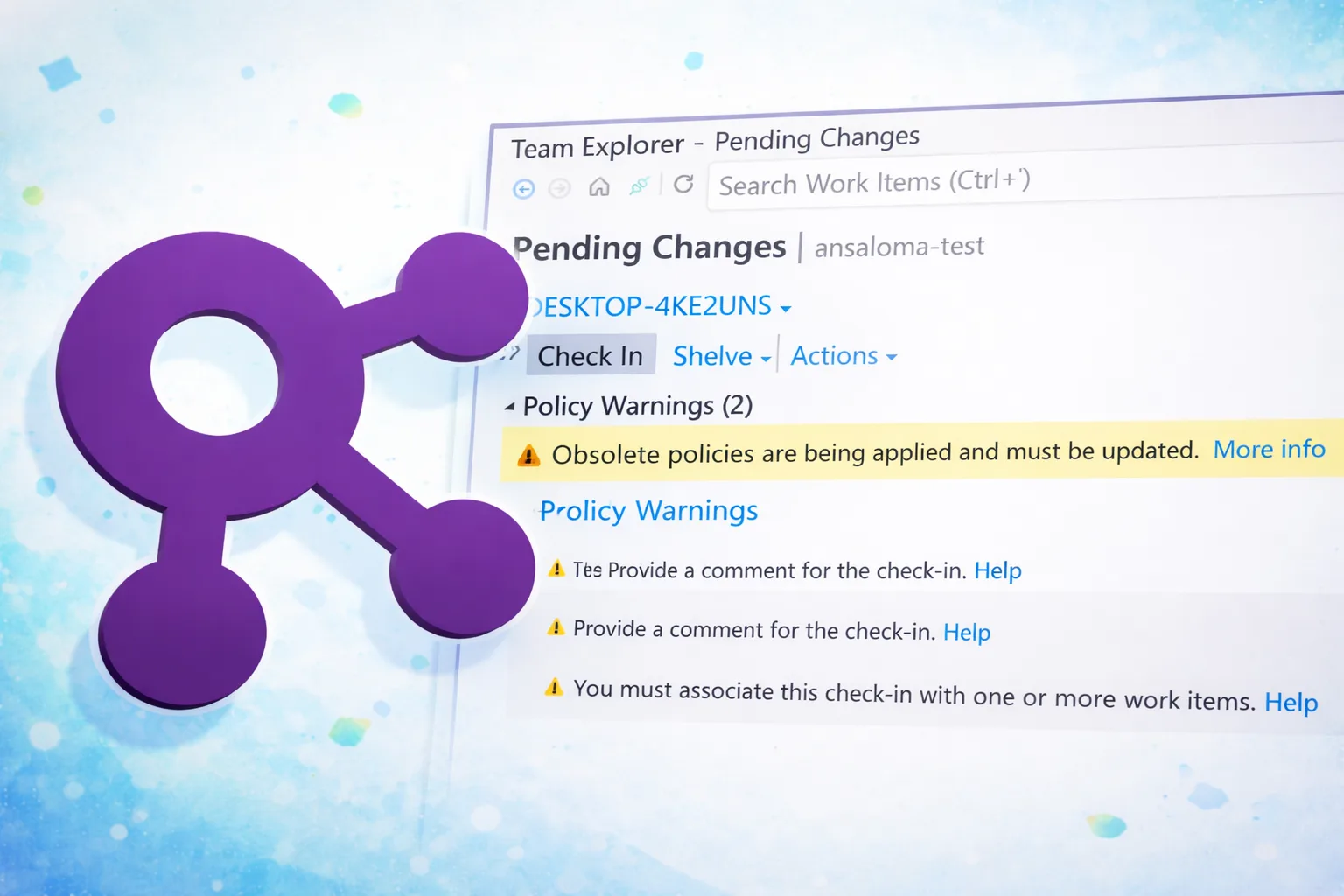
This thread tracks the evolution of TFVC check-in policies and their management. Initially, it focused on updating policies to a new storage format, with phased rollouts for user opt-in and eventual disabling of obsolete policies. This post details the final phase of deprecation where remaining obsolete policies will block check-ins and are no longer manageable through Team Explorer. It provides a C# code snippet using the ExtendedClient library to programmatically remove these policies for administrators. Phase I (User opt-in) and Phase II (Disable saving) are complete. Phase III (Full disabling) is planned for February 2026, where reading of obsolete policies will also be blocked.
This thread tracks the evolution of Git pull request merge logic. It explains how delta file changes are determined by comparing branches against their merge-base commit, the conditions under which merge conflicts arise, and scenarios where Git appears to ignore file changes. The goal is to help users understand and troubleshoot Git merging behavior. This post adds the ability to perform rebase and semi-linear merge options when completing pull requests in Azure Repos, in addition to existing me. It also introduces improvements to pull request templates for multi-level branches, enhanced pull request notification clarity by removing low-value notifications and simplifying remaining ones, and improved comment navigation from pull request links. The Azure DevOps MCP Server continues to grow, enabling interaction with repositories, branches, commits, and pull requests directly from tools like VS Code and GitHub Copilot. Coming soon are improvements to the Git policy configuration APIs for more efficient retrieval of all policies applying to a repository, and further pull request improvements such as highlighting outstanding comments, allowing authors to reset a pull request, and filtering by tags.
This thread tracks the evolution of Team Foundation Source Control proxy server capabilities. The proxy is designed to boost network performance for distributed teams by caching source control files locally, reducing bandwidth usage and download times across slower network links. It serves client requests from its local cache, downloading files from the main Team Foundation Server only when not present in the cache. Maintenance involves monitoring performance counters like cache size, hits, misses, and disk space utilization. This post details the configuration file nodes for the Team Foundation Server Proxy, including elements for server URIs, cache root, cache limit policies (percentage-based and fixed-size), statistics persistence time, and reader/writer chunk sizes. It also outlines the manual process of editing the proxy.config file and recycling the application pool for changes to take effect.
This thread tracks the evolution of CI/CD for Go applications to Azure App Services, incorporating feature flags managed by Azure App Configuration for dynamic control of application features. This enables advanced deployment strategies like A/B testing and blue-green deployments, allowing for controlled rollouts and rollbacks. The integration facilitates managing application behavior and testing configurations without code redeployment. This post details best practices and anti-patterns for using Azure Developer CLI with layered infrastructure for deploying containerized applications to Azure Container Apps, enabling a "build once, deploy everywhere" pattern with separated container operations and layered infrastructure configuration.
Azure Pipelines continues to evolve its release definition editor, introducing a pipeline view for visualizing deployment progression across environments. This includes in-context configuration for approvals, environment settings, and deployment properties. The editor also features improved task and phase editing, centralized variable management, and the application of deployment templates. This enhances the user experience for managing complex release workflows and promotes consistency through. This post introduces a preview of the Continuous Delivery feature for App Services in the Azure portal, simplifying the setup of a robust deployment pipeline that builds, runs tests, and deploys to staging and production for every code commit. It supports VSTS and GitHub as source repositories and ASP.NET/ASP.NET Core applications, with options for load testing and staging environments.
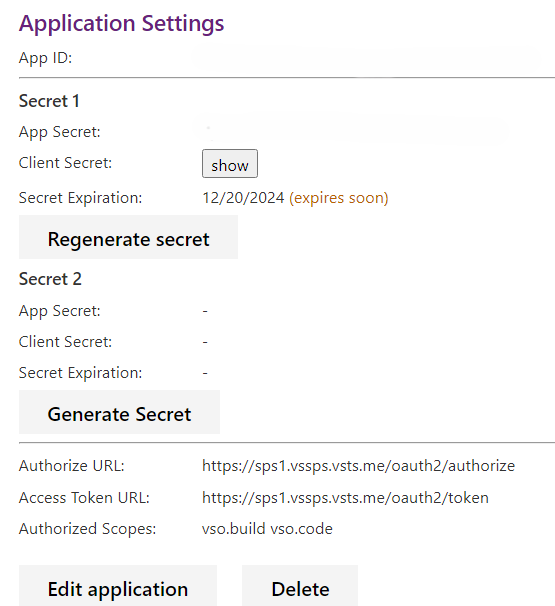
Azure DevOps OAuth apps are being deprecated in 2026, encouraging migration to Microsoft Identity platform. Regular removal of apps with expired secrets (over 180 days) will occur. New overlapping secrets feature allows downtime-free secret rotation for apps with long-lasting secrets. New Azure DevOps OAuth app secrets will default to a 60-day lifespan.
Azure DevOps Services and Server now support SHA-2 class key exchange algorithms (diffie-hellman-group-exchange-sha256) for SSH connections, addressing compatibility issues with newer OpenSSH clients that default to disabling SHA-1. This change was rolled out to Azure DevOps Services on March 6, 2020, and is being brought to Azure DevOps Server 2019 via an April 2020 patch, with Azure DevOps Server 2018 to follow. Additionally, Alternate Credentials authentication is being deprecated due to security concerns. This post announces the mandatory requirement of Server Name Indication (SNI) for all incoming HTTPS connections to Azure DevOps Services starting April 23rd, 2025, impacting older clients and software that do not support SNI.
Project Bicep is a Domain Specific Language (DSL) for ARM templates, offering a transparent abstraction of ARM templates with a cleaner syntax for code reuse. It aims to simplify infrastructure description, validation, and deployment to Azure. The language is designed for ease of learning, modularity, and robust tooling with early validation before deployment. This post details integrating Bicep templates into Azure DevOps Pipelines for automated CI/CD workflows, enabling repeatable and reliable deployments, and introduces a "build once, deploy everywhere" pattern using conditional Bicep deployment, environment variable injection, package preservation across environments, and automated CI/CD promotion from development to production.
Azure DevOps process customization continues to evolve with enhancements to work item state transitions, UI modernization for Azure Repos, and expanded capabilities in Azure Pipelines, Azure Artifacts, and reporting. This post introduces the ability to configure work item types (specifically bugs) to appear on either the task board or the product backlog, but not both, by modifying work item definitions and category assignments using the `witadmin` command-line tool. This allows teams to align b
Visual Studio project homepages now support a 'Welcome' tab, configurable via Markdown files (README.md) checked into version control. This feature allows teams to easily maintain project documentation alongside their code, with support for GitHub Flavored Markdown rendering. For TFVC projects, additional Markdown files in the root of the Team Project folder are navigable. For Git projects, the left-hand navigation displays repositories for documentation selection. The rendering is powered by the Markdown renderer. This post introduces the general availability of Markdown support for large text fields in work items, allowing users to opt-in to use a Markdown editor for individual work items and fields. It covers best-effort conversion of existing HTML to Markdown, sticky editor preferences for new work items, and automatic conversion of pasted HTML. The REST API also supports setting the format to Markdown via the `/multilineFieldsFormat` setting.
Azure Pipelines continues to enhance its deployment capabilities with updates to hosted agent images and the introduction of agent-based deployments. Agent-based deployment allows for direct installation of agents on target servers, enabling rolling updates and high availability. Deployment groups logically group targets, representing physical environments and specifying security contexts. Bootstrapping agents is simplified with cmdlets, and integration with Azure resources is planned. This evolution now includes support for building and testing Windows 8 "Metro Style" applications using Team Foundation Build 2011 Express, requiring specific configurations for developer licenses, build service interactivity, and the handling of .appx package formats for test execution.
Azure DevOps Services now supports Azure Service Tags for managing networking configurations, simplifying the process of allowing traffic from specific Azure services. This addresses the past issue of IP address changes requiring manual firewall updates. Service Tags can be used for inbound connections from Azure DevOps to customer-controlled resources like SQL Azure VMs, on-prem repositories, and Splunk for Audit Streaming. Microsoft Hosted Agents still require allowing the entire geography, with this transition to Akamai and Azure Front Door CDNs requiring specific domain URL allow-listing.
Azure Pipelines continues to evolve its CI/CD capabilities with Managed DevOps Pools (MDP), a fully managed service that combines the flexibility of Scale Set agents with the ease of maintenance of Microsoft Hosted agents. MDP allows teams to quickly spin up custom DevOps pools tailored to their workload's unique needs, including regional deployment, custom software installation, optimized scaling with standby agent modes, and private network connectivity. New features include support for new Azure SKUs, stateful agents, and the ability to pick any SKU, additional storage, and geographic co-location. The host-on-behalf model reduces management overhead and improves reliability.
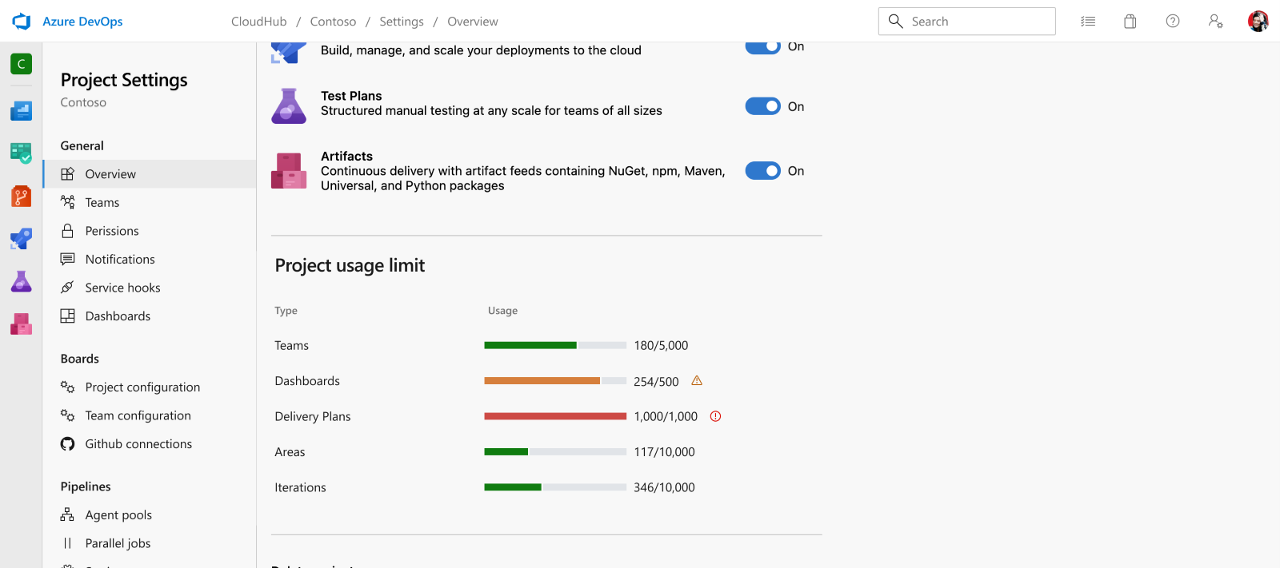
Azure DevOps has introduced a work item revision limit of 10,000 to prevent performance and usability issues caused by automated tools generating excessive revisions. This limit affects updates via the REST API, returning a 500 status code with a specific exception message. Manual updates through the web interface are still permitted. Users with tooling that uses the Work Item Update REST API are advised to check responses, catch exceptions, mark work items for ignoring further updates, and cons. This thread tracks the evolution of Azure DevOps object limits, introducing real-time visibility into resource usage for each organization and project directly within Azure DevOps. This enhancement provides visibility into commonly asked object limits, making it easier for users to manage resources proactively and avoid potential issues.
Azure Pipelines continues to evolve its CI/CD capabilities, with this post detailing the integration of Codecov for code coverage tracking. This builds upon existing functionality for publishing test results and enables tokenless uploads for public Azure Pipelines projects, simplifying secret management and providing enhanced reporting for code coverage over time. The integration allows for ongoing coverage reports without manual secret management.
This thread tracks the evolution of Git's commit-graph feature for accelerating operations in large repositories. Initially focusing on the commit-graph itself and generation numbers, it has expanded to incorporate Bloom filters for optimizing file history calls and advanced graph algorithms for topological sorting. The goal is to significantly speed up history queries by intelligently avoiding unnecessary tree walks and ensuring correct ordering of commits. This post details improvements to the Trace2 logging framework for detailed performance analysis of Git commands, enabling engineers to identify and address bottlenecks in large repositories.
Azure DevOps process customization continues to evolve with enhancements to work item state transitions, UI modernization for Azure Repos, and expanded capabilities in Azure Pipelines, Azure Artifacts, and reporting. This post introduces the general availability of moving projects from a Hosted XML process to an Inherited process, allowing for the adoption of the modern inherited process model. This migration involves cloning the Hosted XML process, configuring and verifying the new inherited process, and then changing the project to use it. The process is irreversible and requires thorough testing with a test project before migrating live projects.
Azure Artifacts supports hosting and consuming packages from various repositories, including Google Maven Repository, Gradle Plugins, Jitpack, and PowerShell Gallery, as upstream sources. It also introduces a new security behavior to limit access to externally sourced packages when internally sourced packages are present, preventing the inadvertent consumption of malicious packages. Organizations can opt out of this behavior via an organization-wide security policy. Azure Artifacts also supports ingesting Universal Packages from different ADO organizations into your feed, with a size limitation of up to 4TB. Upstreams for Universal Packages are configured the same as upstreams for any other package type.
Azure Pipelines enhances multi-stage YAML pipelines with new resource types (pipelines, ACR containers) for triggering and traceability. It introduces canary deployment strategies for AKS using Service Mesh Interface (SMI) for more accurate traffic splitting, and rolling deployments for Virtual Machines (private preview). Pipeline Artifacts and Pipeline Caching are now generally available, improving build output storage and reducing build times by reusing dependencies. This post introduces Environments and deployment strategies for CD in YAML, along with Kubernetes integration.
Azure Pipelines Test Analytics provides insights into test failures, pass rates, and trends. It helps identify flaky tests, problematic test files, and owners, and allows for grouping and filtering data by various pivots like stage, branch, and owner. It also supports measuring test quality upstream and optimizing test efficiency by identifying long-running tests. The feature aims to improve pipeline health and shorten release cycles by addressing test debt and unreliable tests. This post introd
Azure DevOps has enhanced its Queries Hub to streamline query management and improve discoverability. New features include expanded directory pages with query metadata, keyword filtering, breadcrumb navigation, bookmarking of query folders, and a dedicated favorites dropdown. The '@CurrentIteration' macro has been updated to support team parameters and integer offsets for querying past and future sprints. The 'Save as' functionality now copies charts to new queries, and expanded work item detail views are available. This post details the internal implementation of the 'Backlog Priority' and 'Stack Rank' fields, explaining the 'sparsification' logic used to maintain order in large backlogs and the optimizations introduced in TFS 2013 Update 2 to improve performance by increasing the number range and refining gap-finding algorithms.
Azure Load Testing provides a fully managed service for generating high-scale load and identifying application performance bottlenecks. This includes support for creating custom load test plugins to extend functionality, such as dynamically adjusting user load during tests. The service integrates with Azure DevOps for CI/CD pipelines and offers various reporting and analysis capabilities. This post introduces the ability to specify where load test traffic is generated from, allowing users to col
This thread tracks patching and maintenance for Team Foundation Server (TFS) and Azure DevOps Server. It includes releases of security patches, cumulative updates, and detailed installation instructions for various scenarios like load-balanced application tiers and SQL mirroring/AlwaysOn configurations. The focus is on ensuring system stability and security through timely updates and adherence to proper installation procedures. This post details the steps for migrating the Release Management Server.
This thread tracks the evolution of Visual Studio Online (VSO) and Team Foundation Server (TFS) extensibility and marketplace capabilities. It covers the development of client libraries for .NET and Node.js, an extensibility model for the web experience, and tools for jumpstarting extension development. Recent updates include the release of a Yeoman generator for VSTS extensions, which simplifies the creation of project-level web hubs, actions, build/release tasks, dashboard widgets, and service hooks. This post announces the release of Team Explorer Everywhere (TEE) 14.0.3, which includes open-sourcing the project and joining the Eclipse Foundation, multi-factor interactive authentication for the command-line client, improved browsing of projects and repositories, and added feedback support.
Azure DevOps Graph connectors bring work items and wikis into Microsoft Search. The Work Items connector indexes tasks, epics, user stories, bugs, and features with security trimming up to the project level. The Wiki connector indexes project and code wikis with security trimming. Future support for eDiscovery on these connectors is planned. This post details how Azure Sentinel can be used to monitor Azure Kubernetes Service (AKS) clusters for security threats and vulnerabilities, integrating security information event management (SIEM) and security orchestration automated response (SOAR) capabilities.
This thread tracks the evolution of Team Foundation Server (TFS) and Azure DevOps data warehousing and reporting capabilities. It includes tools and techniques for analyzing database sizes, test attachment sizes, and source control folder sizes to aid administrators in managing their TFS environments. The TFS Administrators Toolkit is a key component, offering features to clean projects, update reports, and manage work item types. This post details the architecture of the data warehouse, including its relational and OLAP components, and the synchronization process for data updates.
This thread tracks the evolution of feature flagging patterns and their integration into development workflows. It covers using feature flags for risk mitigation (kill switches), beta feedback and feature targeting (canary/dark launches), hypothesis-driven development (tying metrics to code), and long-term access control (subscription plans, SKU management). The integration with Visual Studio Team Services (VSTS) via extensions is also a key aspect, enabling flags to be tied per environment into Azure App Configuration. This post details the use of Azure App Configuration and GitHub Actions for deploying a Java Spring Boot application to Azure App Service, demonstrating how feature flags can control application behavior like enabling/disabling UI elements or features, and their application in A/B testing and blue-green deployments.
Azure DevOps Auditing now supports streaming of audit data to external systems like Splunk, Azure Monitor Logs (with Azure Sentinel integration), and Azure Event Grid. This enables real-time alerting, advanced data analysis, anomaly detection, and long-term storage beyond the default 90-day retention. The feature is available in public preview and can be configured by Project Collection Administrators or users with the 'Manage audit streams' permission.
Introduced local development capabilities for Azure Stream Analytics jobs using VS Code and ASA Tools extension. This enables developers to run, debug, and unit test Stream Analytics queries locally with sample or live inputs, facilitating faster feedback loops, source control integration, and CI/CD pipelines. The feature supports local job runs without an Azure subscription and includes an npm CI/CD package for unit testing.
This thread tracks the evolution of Infrastructure as Code (IaC) deployment by integrating Pulumi with Azure. It demonstrates how to automate the testing and deployment of Azure resources defined by Pulumi programs within a CI/CD pipeline. The focus is on ensuring infrastructure integrity through automated testing and enabling repeatable, reliable deployments. This post specifically details using Python with Pulumi to deploy an Azure App Service.
This thread tracks the evolution of Azure Cosmos DB, focusing on its various APIs and migration strategies. It highlights the API for MongoDB and Cassandra API, discussing their benefits and providing demos. The post also covers common use cases, autoscaling, and how to upgrade database accounts for new features. Migration strategies for existing workloads to Azure Cosmos DB are also discussed, including live migration demos for Cassandra. This post details using Azure Database Migration Service for migrating on-premises databases to Azure SQL.
Introduced Azure Durable Functions as an extension of Azure Functions to enable stateful workflows using orchestrator and entity functions. Supports C#, JavaScript, Python, F#, and PowerShell. Key features include event-driven code, function chaining, orchestration, coordination, and automatic state management for long-running processes, offering scalability and cost control for complex automation tasks.
This post continues the exploration of WebAssembly (WASM) as a cloud-native runtime. It details experimental PaaS platforms for running WASM workloads, the `yo wasm` tool for environment setup, and a preview feature in Azure Kubernetes Service (AKS) for running WASM workloads. The post also covers local development and debugging using tools like Wasmtime, Hippo, and Krustlet, and mentions integration with Azure Container Registry for AKS deployments.
Azure Pipelines provides a comprehensive CI/CD solution for open-source projects, offering unlimited build minutes, 10 parallel pipelines for free, cross-platform build support (Linux, Windows, macOS), scheduled builds, publishing of test results in various formats, and build badges for project READMEs. This enables efficient maintenance, rapid validation of pull requests, and clear visibility into project health for contributors and users. This post introduces the capability for public projects to use Azure Pipelines for free, with unlimited build minutes and 10 parallel jobs.
This thread tracks the evolution of Git security vulnerability remediation. Initially, it focused on a critical Git security vulnerability (CVE 2018-11235) that could lead to arbitrary code execution. The fix involved updating Git clients to version 2.17.1 and implementing server-side checks in Visual Studio Team Services (VSTS) to block malicious repositories. The vulnerability arose from how Git handles submodules, allowing specially crafted repositories to execute post-checkout hooks. The solution restricts submodule folder names to prevent malicious paths. This post details a new vulnerability (CVE 2017-1000117) related to Git URL parsing and embedded command-line options, particularly affecting submodules. It outlines the problem where malicious URLs can execute arbitrary code via SSH's ProxyCommand functionality, and the solution which involves examining submodule URLs more closely to block those that begin with a hyphen ('-') and resemble command-line options.
This thread tracks the evolution of static website hosting options on Azure. It now includes a detailed walkthrough of setting up a CI/CD pipeline for Azure Static Web Apps when the source code is hosted on GitHub and the CI/CD pipeline is managed by Azure DevOps. The post covers updating the pipeline to use the GitHub REST API for commenting on pull requests, generating GitHub Personal Access Tokens, and configuring pull request validation, including security considerations for forks. It also provides the YAML configuration for the pipeline.
Introduced Grafana as a tool for aggregating data from Azure Monitor, Azure Log Analytics, and Application Insights to build powerful, customized dashboards. The post covers Grafana installation options (full application, Docker, Azure Marketplace VM, Grafana Cloud), connecting Grafana to Azure Monitor using a Service Principal, and creating custom dashboards by visualizing metrics. It also demonstrates importing pre-configured dashboards from Grafana.com for specific Azure services like AKS.
This post introduces Azure Data Factory as a cloud-based ETL and data integration service for creating data-driven workflows. It covers orchestrating data movement and transforming data at scale, using built-in connectors, and visually constructing ETL processes with data flows or compute services like Azure HDInsight Hadoop, Azure Databricks, and Azure SQL Database. The post also touches on differences between ADF and Synapse, data lake ETL patterns, and building an ETL flow with sample data.
This thread tracks the evolution of Azure container options, detailing Azure Kubernetes Service (AKS), App Service, Azure Container Instances (ACI), Azure Batch, Service Fabric, Azure Container Registry (ACR), and Azure Red Hat OpenShift. It emphasizes how containers abstract underlying OS and infrastructure, enabling portability and efficient deployment of applications. The post highlights the benefits of each service for different use cases, from managed Kubernetes to serverless container execution. This post specifically discusses migrating an application from a virtual machine to containers, covering container management for deployment, options for container registries, and ways to manage and scale deployed containers. It also touches on the advantages of using containers and demonstrates container creation.
Azure DevOps Release Gates integrate with ServiceNow Change Management for automated change request creation and approval before stage promotion, enhancing governance and providing bi-directional traceability. This builds upon existing release gate functionality and Azure Policy integration.
This post continues the evolution of migration strategies by detailing a practical walkthrough of migrating Work Items and Source Code from on-premises TFS to Visual Studio Online using Excel and direct source code migration. It builds upon the conceptual guidance of the first whitepaper, providing a step-by-step approach for a simulated environment and addressing common post-migration questions.
This post introduces Ansible as an open-source automation tool for configuration management and continuous delivery on Azure. It details Ansible's components like control nodes, managed nodes, inventory, modules, tasks, and playbooks. It also provides guidance on using Ansible with Azure resources, including virtual machines and web apps, and links to relevant Microsoft Docs and a YouTube tutorial.
Dapr is an open-source, portable, event-driven runtime that reduces the overhead in creating distributed microservices in the cloud. It helps provide options to create microservices using any language, with any framework, on any platform. Dapr helps codify best practices for distributed services infrastructure without requiring expertise in cloud-native architecture. This post details Dapr's installation, local usage, and cloud deployment on Azure, highlighting Dapr v1.0.0-rc.3.
Bridge to Kubernetes allows developers to debug decoupled applications running in Kubernetes locally, bridging the gap between local development and cloud environments. This enables developers to connect to their Kubernetes cluster and debug their services as if they were running locally, even in abstracted architectures. This feature aims to improve developer confidence and streamline the debugging process for microservices.
Azure Pipelines provides a comprehensive CI/CD solution for open-source projects, offering unlimited build minutes, 10 parallel pipelines for free, cross-platform build support (Linux, Windows, macOS), scheduled builds, publishing of test results in various formats, and build badges for project READMEs. This enables efficient maintenance, rapid validation of pull requests, and clear visibility into project health for contributors and users. This post introduces the capability for public projects to use Azure Pipelines for free, with unlimited build minutes and 10 parallel pipelines. It also details how to integrate Jenkins as a CI system with Azure DevOps Release Pipelines for CD, enabling end-to-end traceability, work item tracking, manual approvals, and deployment to various services. The integration involves installing the Team Foundation Server plugin on Jenkins and configuring a Jenkins artifact source in Azure DevOps.
Azure Boards continues to evolve with enhanced reporting and visualization capabilities for Kanban and Sprint workflows. This includes interactive Sprint Burndown, Cumulative Flow Diagram (CFD), and Velocity reports, offering deeper insights into team progress, bottlenecks, and planning. Recent updates focus on improving user experience by introducing new system fields (Board Column, Board Column Done, Board Lane) that capture valuable data from the Kanban board. These fields are now integrated. Future plans include releasing a public preview of the widget SDK in Q1 of 2016, enabling custom widget development. Auto-refresh for dashboards is planned, and the widget catalog will be improved for better discoverability and placement. New widgets for builds, work items, tests, release management, and countdowns are planned, along with a dedicated cumulative flow diagram widget and the ability to display markdown files from repositories.
This thread tracks the expansion of Azure's AI and High-Performance Computing (HPC) infrastructure through new virtual machine offerings powered by AMD's latest AI and EPYC datacenter processors. It introduces Azure HDv2 VMs for demanding CPU workloads in AI data preparation, search, reinforcement learning, and agent coordination, featuring high core counts, substantial RAM, NVMe storage, and high-speed networking. Azure HXv2 VMs are announced as an evolution of the HX series, further optimizing for silicon design and technical computing with improved single-threaded performance, cache, and 800 Gb InfiniBand. ND MI455X v7 VMs are introduced for production-scale AI inference workloads, powered by the AMD Helios rackscale solution.
This thread tracks the evolution of creating and managing isolated virtual networks for build-deploy-test automation. It began with explaining network virtualization concepts using SCVMM and has expanded to cover dynamic provisioning of these isolated networks from TFS/VSTS Build & Release pipelines. The focus is on enabling self-service creation of complex network topologies, including AD-backed and non-AD-backed configurations, with integrated agents for deployment and testing.
Azure DevOps provides a command-line interface (CLI) extension for Azure CLI, enabling users to manage Azure DevOps capabilities directly from the command line. This offers a streamlined, task-oriented interaction, faster execution, and greater flexibility compared to GUI-based management. The CLI extension supports various Azure DevOps functionalities, including managing builds, releases, and other project-related operations. This post details the `az pipelines` command group for creating and managing pipelines, and introduces keyboard shortcuts for faster navigation within the VSTS/TFS web interface.
This thread tracks the evolution of visual testing in CI/CD pipelines, detailing configuration for Azure Pipelines, GitHub Actions, and container-based pipelines. It covers integrating visual testing tasks, setting up environment variables, and using tools like Codefresh and JFrog Pipelines. The focus is on enabling visual tests within containerized environments, including the setup of Selenium Hub and nodes, and addressing challenges like local Chrome access and WebDriver configurations. The series also touches on HTTP checks and capturing build environment variables.
Azure Artifacts supports hosting and consuming packages from various repositories, including Google Maven Repository, Gradle Plugins, Jitpack, and PowerShell Gallery, as upstream sources. It also introduces a new security behavior to limit access to externally sourced packages when internally sourced packages are present, preventing the inadvertent consumption of malicious packages. Organizations can opt out of this behavior via an organization-wide security policy. Azure Artifacts also supports Maven/Ivy package management.
This thread tracks the evolution of Git branching and merging capabilities within Visual Studio and Team Foundation Server. It includes updates to the Git client, server-side logic, and tooling to improve consistency, automation, and developer experience. The VSTS team has adopted a 'Release Flow' strategy, which combines trunk-based development with sprint-based releases. This involves a single master branch for daily development, with release branches created at the end of each sprint. Hotfixes are handled separately. This post details how to customize Git settings within Visual Studio, including user identification, default repository location, author images, .gitignore and .gitattributes files, and command-line modifications.
Azure DevOps Services and Server now support SHA-2 class key exchange algorithms (diffie-hellman-group-exchange-sha256) for SSH connections, addressing compatibility issues with newer OpenSSH clients that default to disabling SHA-1. This change was rolled out to Azure DevOps Services on March 6, 2020, and is being brought to Azure DevOps Server 2019 via an April 2020 patch, with Azure DevOps Server 2018 to follow. This post announces the general availability of SSH support for Git repos in both
This thread tracks the evolution of debugging and hot-reloading capabilities for Azure DevOps extensions. Initially focusing on streamlining the development workflow by enabling direct debugging and hot-reloading from local environments, it has expanded to cover various aspects of extension development and deployment. The goal is to accelerate the development cycle for Azure DevOps extensions.
This thread tracks the evolution of Coded UI Test functionality and its alternatives. Initially, Coded UI Test was the primary tool for UI automation. With its deprecation in Visual Studio 2019, the focus has shifted to migrating to open-source alternatives like Selenium for web applications and Appium with WinAppDriver for desktop and UWP apps. The goal is to provide robust and maintainable solutions for UI testing in modern development workflows. This post details improvements to Coded UI Test playback performance by optimizing search hierarchies, leveraging PlaybackSettings, restricting search depth with MaxDepth, prioritizing window search properties, utilizing NextSibling for faster searches, employing AlwaysSearch for dynamic controls, and using unique properties for items within containers. It also provides scenario-specific guidelines for form filling with CopyPastedText, selecting items in lists with SelectedItems vs. SelectedIndices, expanding TreeView nodes, cautious usage of the Items property, and comparing WinList, WinTable, and WinTree. Finally, it offers debugging tips for performance issues by analyzing warning and error messages in logs.
Azure Pipelines introduces Pipeline Caching to improve performance on hosted build agents by caching common scenarios like package restore. Initially, this involves release tasks for saving and restoring files with user-defined cache keys. Future iterations will enable caching by default for popular ecosystems (NuGet, pip, npm) and further improve task performance based on user feedback.
Azure Pipelines supports running pipeline jobs within custom Docker containers and has expanded this to include 'service containers'. Service containers are additional, helper containers that are automatically managed (started, stopped, networked) by Azure Pipelines and made accessible to the main pipeline job. This simplifies the setup and teardown of dependencies like databases or caches for integration tests, allowing developers to define required services, containerize them, and have them automatically available during pipeline execution. This feature supports various scenarios, including basic service availability and matrix-based testing against multiple versions of a service (e.g., different database backends).
This post introduces a whitepaper and implementation guide for applying DevOps practices to blockchain projects, specifically focusing on smart contracts and infrastructure as code. It covers tooling for development, unit testing, debugging, managing test environments for multi-party transactions, and source code control, build, and release pipelines in a global, multi-party environment. The implementation guide leverages Visual Studio Code, GitHub, Azure DevOps, and open-source tools like Truffle.
Azure DevOps is now available over Azure ExpressRoute, enabling private, reliable, and faster connections for customers in sectors like government and financial services. This connectivity is achieved through Microsoft peering and route filters, specifically the 'Azure Global Services' route filter (BGP community 12076:5050). This applies to various Azure DevOps services, including the dev.azure.com URL, visualstudio.com URLs, self-hosted agents, and the Visual Studio Marketplace/Subscriber port. This post details the migration of VSTS SSH to Azure's global network, leveraging Azure Traffic Manager to route requests to edge nodes for reduced latency, and the subsequent requirement for users to update their SSH remote URLs.
This post introduces a framework for effective Static Application Security Testing (SAST) within DevSecOps, emphasizing the need for relevant patterns, cost-effective detection, and business motivation for fixes. It proposes a formula for calculating the value of static analysis and categorizes findings into 'hot' (immediate, low-noise), 'cold' (deep analysis, scheduled), and 'lukewarm' (discarded) results. A case study with MSRC and Semmle QL demonstrates how static analysis can significantly improve security findings and efficiency.
This thread tracks the integration of Git-TF with Team Foundation Service, focusing on authentication and compatibility updates to ensure seamless version control operations between Git and TFS. This post adds the ability to associate Team Services or Team Foundation Server work items with commits directly from IntelliJ and Android Studio. The workflow involves selecting work items from a dialog within the commit dialog, which then updates the commit message with the work item details using the #id tag for server-side association upon push. This integration aims to simplify the process of linking code changes to work items without disrupting the developer's workflow.
The Work Item Tracking (WIT) system has evolved to better handle identity fields, distinguishing them from plain text fields. This change modernizes the underlying system and supports future features. Identity fields now uniquely identify users and groups, with new UI controls and updated REST API and ClientOM behaviors. The system supports non-identity values but recommends against them. Identity fields are scoped to the entire team project collection. The new picker searches all valid identities. This thread tracks the evolution of the Team Foundation SDK, specifically its coverage of the server object model and the client object model for work item tracking. Updates include adding more reference material, removing less valuable content, and providing code snippets for connecting to a work item store.
This thread tracks the evolution of SonarQube integration with Azure DevOps and Team Foundation Server for static code analysis and technical debt management. It covers MSBuild, Maven, and Gradle build tasks, pull request integration, Roslyn analyzer support, SonarLint for Visual Studio, dashboard widgets, secure SonarQube installations in Azure, and the integration of security and architecture dependency validation into the CI/CD pipeline. This post details the release of version 2.0 of the Son
This thread tracks the evolution of GVFS (Git Virtual File System) to support platforms beyond Windows. Initially developed for Windows to enable efficient work in extremely large Git repositories, this thread now includes the design and prototyping of GVFS for macOS. The macOS implementation leverages Kauth kernel extensions to virtualize file system operations, allowing for on-demand enumeration and content loading. Early prototype results show promising application compatibility, especially for large repositories. This post introduces the initial GVFS client code for Windows, its protocol extension, and modifications to Git to support GVFS-backed repositories, aiming to enable Git to scale to repos of any size by virtualizing the file system and only downloading files on demand.
This thread tracks the evolution of Team Foundation Server (TFS) and Azure DevOps Lab Management capabilities, focusing on setting up and running automated build-deploy-test workflows. It details the installation of Test Controllers, configuration of Build Controllers and Agents, creation of standard environments using Microsoft Test Manager, and the execution of build-deploy-test definitions. The post also outlines how to extend this to a more realistic scenario with separate test machines and introduces unattended installation capabilities for TFS 2012/2013, allowing for pre-setting configuration parameters via command-line and INI files for efficient deployment of various TFS instance types (Basic, Standard, AT-Only, Build, Proxy, SharePoint Extensions, Upgrade).
This thread tracks the evolution of Team Foundation Server (TFS) and Azure DevOps Server authentication methods and client interactions. It includes updates on local workspaces for improved offline experience, default workspace settings, and the integration of the Feedback client via URI schemes for Windows 8 applications and ASP.NET. The focus is on enabling seamless interaction with TFS/Azure DevOps from various application contexts. This post specifically addresses updating licensing and enabling Kerberos authentication by default in TFS 2017, moving away from explicit NTLM selection to comply with security best practices and the Security Development Lifecycle (SDL). The Negotiate provider is now used by default, falling back to NTLM if Kerberos is not available, aiming to improve security without impacting existing deployments.
The Visual Studio Test Platform has been open-sourced under the MIT license to foster collaborative innovation. This move aims to enable the community of adapter writers, test framework writers, extension writers, and application developers to define and shape the evolution of the platform. This open-sourcing is part of a larger effort to modernize the test platform, including the evolution of MSTest V2, support for .NET Core, and parallel test execution. Visual Studio 2015 Update 1 introduces support for running JavaScript unit tests using frameworks like QUnit and Jasmine via the Chutzpah test runner and its Visual Studio adapter, enabling these tests to be executed on Team Foundation Service hosted build agents.
This thread tracks the evolution of Team Foundation Server (TFS) and Project Server integration, focusing on synchronization, reporting, and configuration. Recent updates include manual configuration for MOSS 2010 dashboard compatibility with TFS 2010, including screencasts, and detailed guidance on verifying the synchronization process for TFS and Project Server integration. It also covers manually updating work item type definitions when mapping issues arise and emphasizes the need for Classic. This post announces the deprecation of the TFS Extension for SharePoint and its web parts, moving towards a loosely coupled model using public APIs and extensibility frameworks. Future integration will focus on embedding TFS/VSTS Dashboards on SharePoint pages and leveraging Power BI for reporting. The Team Explorer Documents pane is also being removed, with a recommendation to use OneDrive for Business sync client.
This thread tracks the evolution of reporting and analytics tools for Visual Studio Marketplace publishers. Initially, it focused on providing publishers with data related to their extensions, such as page views, acquisition information, user feedback, and sales data for paid extensions. The 'Extension reporting hub' was introduced to allow publishers to track these metrics and take actions like interacting with users and responding to reviews. This capability aims to empower publishers to understand and improve their extension's performance. This post announces the general availability of search functionality within the Visual Studio Marketplace, enabling users to find extensions by name, publisher, and description. It also details filtering by category and sorting by relevance, download count, update date, publisher name, and extension name. Search is initially enabled for Visual Studio Team Services and Visual Studio Code, with plans to extend it to Visual Studio extensions.
This thread tracks the evolution of browser-based exploratory testing extensions for Visual Studio Team Services. It provides specific steps for configuring the extension to work with Internet Explorer 11 and Windows 8.1, addressing issues related to Enhanced Protected Mode and add-on enablement. It also includes registry key deletion as a fallback solution and notes that a permanent fix is in progress. This post introduces the ability to perform exploratory testing using Microsoft Test Manager and automatically link test cases and bugs to requirements, building test plans dynamically.
Azure Pipelines provides a robust CI/CD pipeline for Web Apps on Linux, automating the build of container images, pushing them to registries, and deploying to Azure Web Apps. It supports validation in staging environments before production deployment and allows for extension with custom operations like provisioning resources, running scripts, or upgrading databases. This feature integrates with Visual Studio Team Services Git and GitHub repositories, leveraging Dockerfiles for image builds. The Azure portal facilitates configuration and monitoring of these pipelines.
This thread tracks the evolution of Cumulative Flow Diagrams (CFDs) for visualizing work in progress and tracking workflow states within a Scrum development process. It details how to create and use Microsoft Excel spreadsheets to generate CFDs, including defining states, updating daily counts, and interpreting the resulting charts to identify bottlenecks and measure team capacity. The thread also touches upon integrating this approach with Visual Studio Team System and the Team Foundation Server. This post introduces new dashboard widgets for Visual Studio Team Services built on the Analytics Service, including Lead Time, Cycle Time, and Cumulative Flow Diagram (CFD) widgets, providing enhanced insights into team processes and delivery metrics.
Visual Studio debugger enhancements for asynchronous code across C++, JavaScript, and C#/VB. The Call Stack window provides additional stack frames to show the execution path leading up to an asynchronous task, improving the understanding of application flow and bug identification. For C++ and JavaScript, these frames are annotated with '[Async Call]'. For managed code (C#/VB), it shows methods awaiting the current asynchronous operation. This post introduces 'Just My Code' for JavaScript in Win
Team Services notifications have been significantly improved for scale, performance, and extensibility. This includes a better configuration UI for users and administrators, new delivery options for team subscriptions (direct email or team-member-specific), and opt-in 'out-of-the-box' notifications for common events like work item assignments and pull request updates. The integration with Microsoft Teams allows users to stay up to date with alerts for work items, pull requests, commits, and builds. This post reports a known issue with alerts in Team Foundation Server 2012 Update 3 RC1 where some alert subscription evaluations fail with an XPathException, leading to the incorrect deletion of valid subscriptions. A workaround is provided to prevent further deletions by skipping the evaluation exception, and a fix is available in Update 3 RC2.
Visual Studio's architecture modeling tooling has evolved to include enhanced code maps for architectural and dependency analysis. This includes simplified menus, improved performance, progressive display of solution structure, additional link styles, assembly styling, filtering of implicit .NET type dependencies, and robust filtering for code elements and dependency links. The debugger has also been enhanced for child process debugging, with customizable settings for debug engine selection and. This post addresses issues with bidirectional linking between model elements and work items, and the manual deletion of links when they are removed from one side.
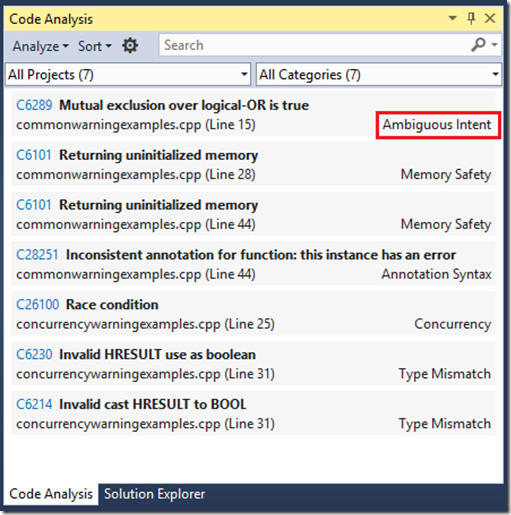
Visual Studio's architecture modeling tooling has evolved to include enhanced code maps for architectural and dependency analysis. This includes simplified menus, improved performance, progressive display of solution structure, additional link styles, assembly styling, filtering of implicit .NET type dependencies, and robust filtering for code elements and dependency links. The debugger has also been enhanced for child process debugging, with customizable settings for debug engine selection and. This post introduces live dependency validation using Roslyn analyzers, improving authoring and developer experience by providing precise issue identification and faster feedback loops.
Code Search enables users to quickly and easily search across their entire Visual Studio account using their web browser. It supports full-text matching and, for certain languages (like C#, C, C++, and Java), understands code structure to search for specific contexts such as class definitions, comments, properties, etc across all their TFVC and Git Projects. It offers semantic ranking and rich filtering by file path, extension, repo, and project, and code type (definition, comment, reference). It integrates with familiar controls in the Code Hub, giving you the ability to look up History, compare what's changed since the last commit or changeset, and much more. This post announces the general availability of Code Search in Visual Studio Team Services and Team Foundation Server "15", with support for Java and semantic ranking.
Application Insights provides visibility into application usage, availability, and performance. It enables data-driven decision-making for product owners by collecting real usage data, allowing for testing hypotheses about potential changes and evaluating their impact. Features include sales funnel analysis, experiment execution (e.g., A/B testing price changes), and bug impact assessment by correlating crashes and exceptions with environmental factors. The platform offers a 360-degree view of a
This thread tracks the evolution of Application Insights, a service providing actionable insights into production applications. It covers out-side-in availability monitoring, application performance monitoring (APM) including exceptions, memory usage, dependency, and system information, and data-driven decisions through customer usage analytics. Data is surfaced via dynamic reports, email alerts, and customizable dashboards. This post announces the preview of Application Insights, highlighting its ability to integrate production monitoring with development tools to enable higher quality code, decrease rework, and reduce cycle times. It specifically mentions the integration of deployment markers with availability monitoring, allowing users to open the changeset associated with a deployment when viewing availability reports.
This thread tracks the evolution of secure file transfer capabilities for CI/CD pipelines. Initially, an SSH task was released to run commands on remote machines. This post introduces the 'Copy Files Over SSH' task, which supports SFTP and SCP protocols for securely copying files to remote servers. This task is available in Visual Studio Team Services and will be available in the next version of Team Foundation Server for on-premises installations. It aims to provide a more secure alternative to.
Azure DevOps Lab Management is evolving to integrate with modern cloud platforms and deployment technologies. The focus is shifting from building platform-specific features within TFS/VSO to integrating with existing platforms like Azure, VMware, and Docker through service endpoints and provisioning/deployment tasks. This includes dynamic provisioning of Azure resources, support for various authentication methods, and extensibility for custom platform integrations. Machine groups will serve as a catch-all for addressable machines. Deployment capabilities are expanding for .NET, Windows, Java, and Linux applications, with integrations for third-party systems like Octopus Deploy, Chef, and Docker. Release Management is being enhanced to model formal pipelines for test, staging, and production environments, as well as less structured, self-service environments for manual workflows. Traceability of releases and activities on environments is also being improved. The goal is to make Lab Management an integral part of Build and Release Management, simplifying consumption of platform features and enabling custom integrations.
This thread tracks the evolution of web performance and load testing capabilities within Visual Studio. It covers improvements in recording and analyzing web tests, particularly for complex applications like SharePoint. Recent updates focus on enhancing the accuracy of recordings by filtering out extraneous requests and improving parameterization for dynamic site names. The goal is to provide developers with robust tools for testing web application performance and reliability. This post details the requirement for the Test Agent to be installed on the Test Controller box for remote load test runs using Visual Studio 11 Beta.
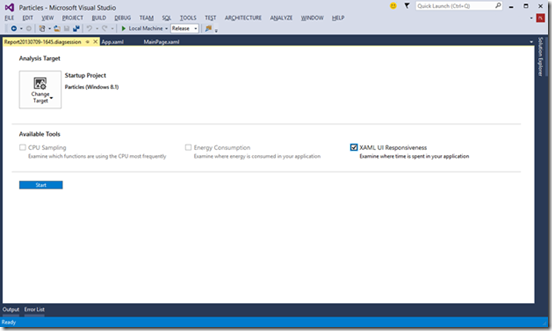
Visual Studio's Performance and Diagnostics hub centralizes profiling tools, offering a unified launch point for various application types and platforms. It supports combining multiple profiling tools for cross-correlation and provides detailed analysis for UI responsiveness, memory usage, CPU, and energy consumption. The hub integrates with F12 developer tools for cross-platform analysis and supports remote debugging. The Energy Consumption tool specifically helps estimate application energy consumption. This post introduces the new CPU Usage tool for analyzing CPU time spent in C++, C#/VB, and JavaScript code, offering detailed breakdowns of function-level CPU utilization and enabling performance optimization by identifying CPU-bound code paths. It replaces the CPU Sampling tool for Windows Store apps and provides a live CPU graph during collection.
This thread tracks the evolution of SonarQube integration with Azure DevOps and Team Foundation Server for static code analysis and technical debt management. It covers MSBuild, Maven, and Gradle build tasks, pull request integration, Roslyn analyzer support, SonarLint for Visual Studio, dashboard widgets, secure SonarQube installations in Azure, and the integration of security and architecture dependency validation into the CI/CD pipeline. This post details the release of version 1.5 of the SonarQube LDAP Plugin, developed in collaboration with SonarSource. This version significantly simplifies configuration for Microsoft Active Directory environments, introduces Single Sign-On (SSO) capabilities leveraging Active Directory credentials, and allows for the direct addition and permission assignment of security groups. The post also provides upgrade paths from previous versions and highlights the availability of the plugin for SonarQube.
Visual Studio debugger enhancements for asynchronous code across C++, JavaScript, and C#/VB. The Call Stack window provides additional stack frames to show the execution path leading up to an asynchronous task, improving the understanding of application flow and bug identification. For C++ and JavaScript, these frames are annotated with '[Async Call]'. For managed code (C#/VB), it shows methods awaiting the current asynchronous operation. This post introduces 'Just My Code' for JavaScript in Win
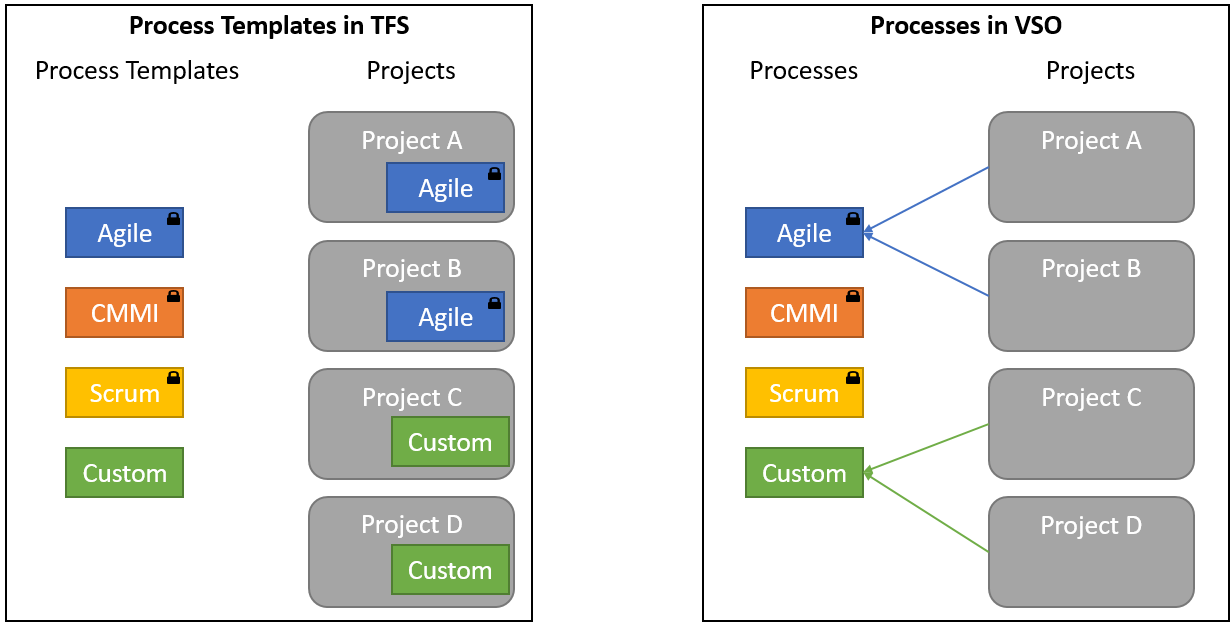
Azure DevOps process customization evolves with shared and inherited processes, allowing for centralized management and easier updates. Users can now add custom fields, modify layouts, and manage process security at the collection level. Projects can be migrated to inherited processes, preserving history and enabling seamless adoption of new features. This phase focuses on adding custom fields and modifying work item layouts.
This thread tracks the evolution of the Visual Studio Emulator for Android. Initially released for VS2015 CTP, it has since added OpenGL, Lollipop, multi-touch, camera simulation, device profiles, and WiFi simulation. This update introduces new platforms (JellyBean 4.2 and Lollipop 5.1), a command-line interface (CLI) for managing profiles and platforms, drag-and-drop zip library installation for restoring apps and data, and SD card simulation. The emulator is now also available as a standalone installer, independent of Visual Studio, for use with other development tools.
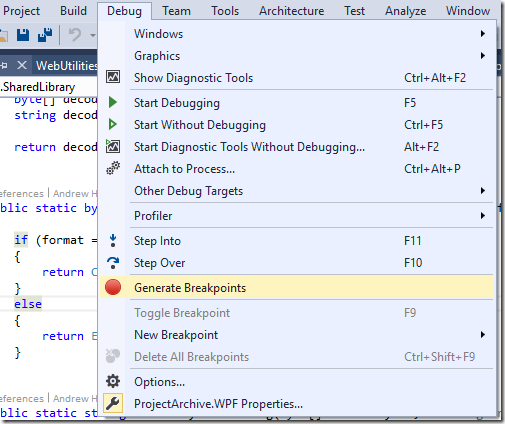
This thread tracks the evolution of breakpoint functionality in Visual Studio. It covers basic breakpoints, hit count, function, filter, tracepoints, conditional, and data breakpoints. The goal is to provide developers with advanced tools for debugging and inspecting application state.
Team Build now supports Subversion as a source code repository, enabling the use of the scriptable, cross-platform build system with existing Subversion repositories. This includes support for mappings, centralized management of the credentials used to connect to both on-premises and hosted Subversion repositories, as well as support for scheduled and continuous integration builds via polling.
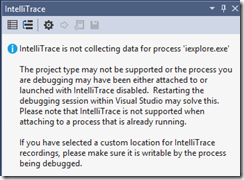
IntelliTrace is enhanced with an Analysis section on the Summary Page to help pinpoint bugs faster by analyzing logs for specific patterns and events indicating problems. In Update 2, this section focuses on highlighting unhandled exceptions in SharePoint applications, aggregating occurrences and providing direct links to the relevant code for debugging. VS2013 Update 2 extends these capabilities to SharePoint applications by collecting ULS log entries as IntelliTrace events, associating them with code navigation. This post adds the ability to easily navigate to Actions and Controllers for Model View Controller (MVC) web sites.
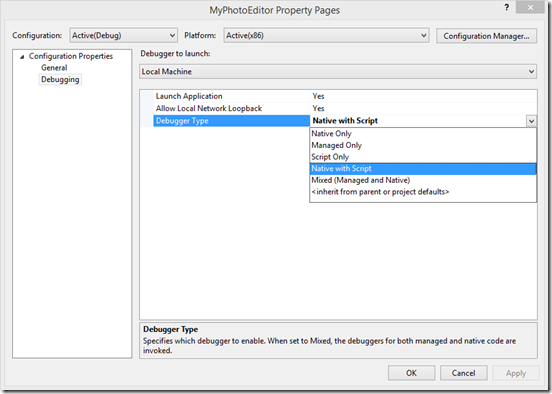
Visual Studio's debugger continues to evolve, with a focus on unifying Edit and Continue (EnC) functionality for both managed and native code. This includes enabling EnC for C++ across both x86 and x64 targets within the default debug engine, eliminating the need to choose between EnC and other advanced debugging features like natvis and the Diagnostic Tools window. The goal is a single, simple setting for EnC across all code types and architectures. This post details how to switch to a legacy managed debug engine for specific scenarios not yet supported by the new engine.
The Concurrency Visualizer is a tool for Visual Studio that allows users to analyze and improve the performance of multi-threaded Windows Desktop applications. It was previously included with Visual Studio 2010 and 2012, and made an optional extension in Visual Studio 2013. This post announces its availability as an update for Visual Studio 2015, with command-line collection tools also available.
This feature thread tracks the generation and use of NGEN PDBs for profiling managed applications on Windows 8 and later. It addresses the challenge of understanding profiling reports when NGEN'd modules lack symbols, by providing a step-by-step process to create NGEN PDBs using the Native Image Generator (ngen.exe) and integrate them into the Visual Studio profiler's symbol path. This enables the display of function names and source code locations in profiling reports, significantly improving the debugging and performance analysis of managed code.
Visual Studio 2013 and later versions provide enhanced tools for diagnosing .NET memory issues in production. This includes the ability to analyze .NET memory dumps to identify memory leaks and inefficient memory usage. Recent enhancements allow developers to navigate directly from memory analysis to the source code definition of objects and find all references to those objects within their project, streamlining the debugging process. Update 2 adds the ability to inspect values of objects and in
Visual Studio's CodeLens provides in-context information about code changes, authors, associated work items, and incoming changes from other branches. This feature is computed on Team Foundation Server (TFS) and involves a pipeline of jobs: Keepup (processes individual changesets), Aggregator (summarizes and merges data), and Cleanup (removes temporary data). A Catchup job handles historical data processing for existing changesets before TFS 2013. Administration is managed via TFSConfig, and upgrades to Visual Studio 2013 Update 2 CTP2 and Team Foundation Server 2013 Update 2 RC introduce the 'Incoming Changes' indicator, which displays changes occurring in various branches on the code element currently being worked on. This indicator provides visual cues for branch relationships (parent, peer, reverse integration, forward integration, distant, baseless merge) and allows users to compare incoming changes with local versions, view changeset details, track progress in the branch hierarchy, ignore specific branches, hide intermediate branch merges, and connect with the author via IM, Video, Email, Lync Call or Voice Call. Users can also disable the indicator via Tools->Options.
Visual Studio's .NET Edit and Continue (EnC) functionality has been enhanced to support lambda expressions, remote debugging, debugging on Windows Phone 10 emulators, and attaching to processes. This builds upon previous improvements and addresses limitations in earlier versions, aiming to streamline the debugging experience for .NET developers. This post details improvements in Visual Studio 2015 CTP 6, including support for adding methods, fields, constructors, properties, events, indexers, and lambda expressions in the Watch window.
This thread tracks the evolution of deploying Azure Cloud Services using Release Management. Initially, it focused on enabling users to author PowerShell scripts for deployment. This post details the process of integrating these scripts into the build and release pipelines, including customizing the Visual Studio solution to include deployment scripts and configuring build definitions to generate necessary artifacts. It also covers preparing the target server and authoring the deployment sequence. This update extends the capability to include starting and stopping Azure VMs as part of the deployment process, managing credentials and using PowerShell cmdlets for Azure VM control.
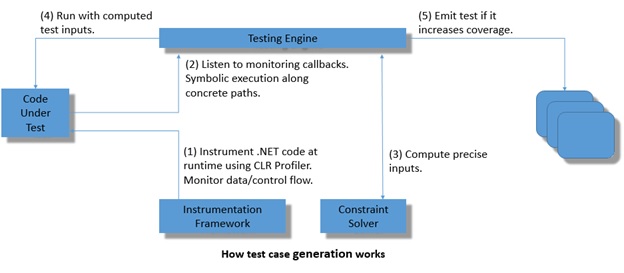
This thread tracks the evolution of automated unit test generation and analysis. Initially introduced as 'Smart Unit Tests', this capability, now named 'IntelliTest', uses runtime instrumentation and monitoring to generate compact test suites with high code coverage. It employs constraint solving to synthesize new input values that explore uncovered branches and potential bugs. The system relies on assertions to connect code coverage with correctness, effectively identifying bugs when assertions are falsified. This post details the initial release of Smart Unit Tests, highlighting its ability to discover code paths, synthesize test inputs, and record observed behavior as a baseline regression suite, or to validate user-defined assertions.
This thread tracks patching and maintenance for Team Foundation Server (TFS) and Azure DevOps Server. It includes releases of security patches, cumulative updates, and detailed installation instructions for various scenarios like load-balanced application tiers and SQL mirroring/AlwaysOn configurations. The focus is on ensuring system stability and security through timely updates and adherence to proper installation procedures. This post details how to set up permissions for the security scenario.
Visual Studio 2013 Update 1 significantly enhances mixed-mode debugging for Windows Store apps, allowing developers to seamlessly debug both managed and native code. This includes improved object inspection in local and watch windows, support for debugger type visualizers, and reliable stepping between WinRT components. Remote debugging is now supported for x86/x64 machines, though ARM machines are not yet supported. The improvements aim to streamline the debugging process for developers working
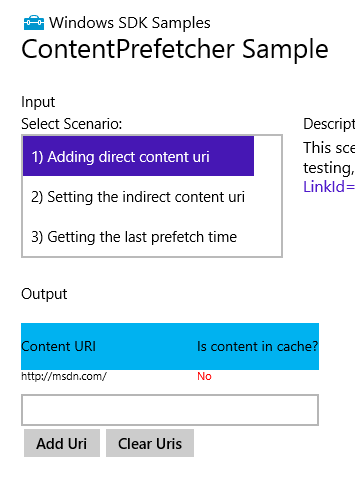
Introduced the ability to manually trigger content prefetching for Windows Store Apps from the Visual Studio Debug menu. This allows developers to test and validate the behavior of the ContentPrefetcher API, which caches app resources before launch to improve startup performance. The feature includes a walkthrough of the process, common status dialogs for troubleshooting, and guidance on ensuring correct registration and relaunching the app after edits.
Visual Studio debugger symbol loading has evolved to improve performance and usability. Key enhancements include making symbol loading fully cancellable, recording symbol misses to avoid redundant searches within a session, and implementing smarter caching for symbols downloaded from network shares. This update aims to prevent Visual Studio from becoming unresponsive during slow or interrupted symbol downloads and to optimize the symbol loading process.
IntelliTrace is enhanced with an Analysis section on the Summary Page to help pinpoint bugs faster by analyzing logs for specific patterns and events indicating problems. In Update 1, this section focuses on highlighting unhandled exceptions in SharePoint applications, aggregating occurrences and providing direct links to the relevant code for debugging. VS2012 Update 2 extends these capabilities to SharePoint applications by collecting ULS log entries as IntelliTrace events, associating them with Correlation IDs, and enabling filtering by Correlation ID in the IntelliTrace window for debugging SharePoint applications.
This thread tracks the evolution of the Microsoft Monitoring Agent's capabilities for capturing detailed exception information. Initially focused on logging unexpected exceptions, this post introduces a specific configuration tweak to include null parameter values in exception data. This enhancement aims to provide deeper insights into the root causes of NullReferenceExceptions, improving debugging and troubleshooting for applications monitored by the agent. Future evolution may include more granular control over data capture or advanced analysis of logged exceptions.
This thread tracks the evolution of tools for analyzing and improving the interaction-performance of XAML-based Windows Store applications. It introduces the XAML UI Responsiveness tool within the Visual Studio Performance and Diagnostics hub, providing detailed analysis of UI thread utilization, visual throughput, XAML parsing, and layout costs. The tool aids developers in optimizing application launch, page navigation, scrolling, and animations to achieve a fluid user experience.
Visual Studio's code analysis experience continues to evolve with a focus on improving user feedback and the overall user experience. Visual Studio 2013 introduces categories for native rules and exposes existing managed code analysis categories in the UI, allowing for more fine-grained grouping of defects. Users can filter results by category and sort them by properties like Rule ID, File Name, and Category. This builds upon previous improvements in Visual Studio 2012, which made code analysis available in more editions, introduced a new UI for viewing results, and improved accuracy.
This thread tracks the evolution of debugging ASP.NET unit and web tests. Initially, it covered attaching the debugger to IIS or the ASP.NET Development Server (Cassini) process, debugging in Web.config, and setting breakpoints. This post updates the topic to clarify errors regarding debugging with Cassini and IIS, providing distinct sections for each. It also covers the difference between 'Debug Selection' and 'Run Selection' for tests.
Introduced support for asynchronous test methods in C++ Windows Store Unit Tests, enabling developers to test asynchronous functions using a helper library that synchronizes asynchronous operations within the test framework.
This thread tracks updates to SQL Server Data Tools (SSDT), including new features like selective XML index support, automatic update checks, and integration with the latest Data-Tier Application Framework (DACFx) and SQL Server 2012 components. It also addresses bug fixes and compatibility with SSDT Power Tools. This post details the release of power tools for Team Edition for Database Professionals, including database refactoring, schema and data comparison at a command prompt, sequential data bound generator for test data, and IntelliTrace for WCF services.
This thread tracks the evolution of the Code Index SDK, focusing on its capabilities for indexing code artifacts. Initially, it introduced the SDK and its purpose. This post details bulk indexing of assemblies into the code index using MSBuild, providing command-line examples and a custom MSBuild project for configuration. It also recaps MSBuild properties and item groups for the loading process and user-callable MSBuild targets.